

Free Download KiCad for Windows PC. It is a unique software product that empowers you to delve into the world of electronic circuits. It enables the creation and development of intricate designs for printed circuit boards (PCBs) while ensuring the accuracy of electronic rule checking (ERC). 免费下载适用于Windows电脑的KiCad。这是一款独特的软件产品,能让你深入电子电路的世界。它支持创建和开发复杂的印刷电路板(PCB)设计,同时确保电子规则检查(ERC)的准确性。
Overview of KiCad KiCad 概述
It is a versatile EDA software package that caters to various electronic design needs. Whether you’re a seasoned engineer or a hobbyist looking to explore the world of PCB design, it offers a user-friendly interface with powerful features. It provides many built-in components, templates, and libraries, making it a go-to choice for professionals and enthusiasts.这是一款功能多样的EDA软件包,可满足各种电子设计需求。无论您是经验丰富的工程师,还是希望探索PCB设计世界的爱好者,它都能提供具有强大功能的用户友好界面。它包含许多内置组件、模板和库,使其成为专业人士和爱好者的首选。
Main Functions of the software 软件的主要功能
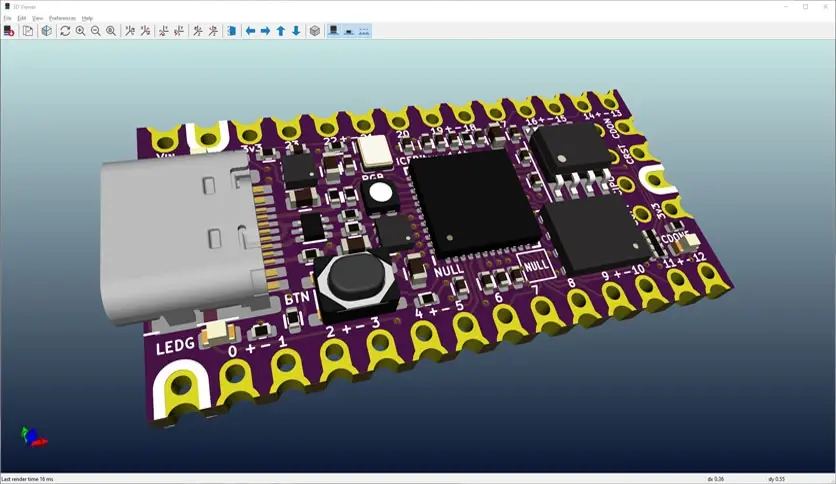
- Built-in 3D PCB Viewer: It boasts a built-in 3D PCB viewer, allowing you to visualize your PCB designs in three dimensions. This feature provides insight that traditional 2D views can’t match. With the 3D viewer, you can rotate and examine your PCB from various angles, enhancing your design precision.内置3D PCB查看器:它拥有内置的3D PCB查看器,可让您以三维方式可视化PCB设计。此功能提供了传统2D视图无法比拟的见解。借助3D查看器,您可以旋转并从各个角度检查PCB,提高设计精度。
- Project Management: The software is an efficient project manager, helping you keep your electronic design projects organized and accessible. This integrated project management capability streamlines your workflow, making handling complex projects with multiple components and schematics easier.项目管理:该软件是一款高效的项目管理器,能帮助你整理电子设计项目并方便查阅。这种集成的项目管理功能可简化你的工作流程,让处理包含多个组件和原理图的复杂项目变得更加轻松。
- Schema Editor—Eeschema: Eeschema is a powerful schema editor designed to create and edit electrical circuit diagrams. It provides an intuitive platform for drawing and connecting components, ensuring your circuit design is accurate and understandable.原理图编辑器—Eeschema:Eeschema 是一款功能强大的原理图编辑器,旨在创建和编辑电路图。它提供了一个直观的平台,用于绘制和连接元件,确保您的电路设计准确且易于理解。
- Component Editing: The software includes a component editor for modifying and customizing printed circuit boards (PCBs). This feature is essential for tailoring designs to your needs and ensuring compatibility and functionality.元件编辑:该软件包含一个元件编辑器,用于修改和定制印刷电路板(PCB)。此功能对于根据您的需求定制设计以及确保兼容性和功能性至关重要。
- Footprint Template Editing: It offers a tool for editing footprint templates, which allows you to control your PCB designs precisely. This capability is handy when working with components that require custom footprints.封装模板编辑:它提供了一个用于编辑封装模板的工具,使您能够精确控制您的PCB设计。在处理需要自定义封装的元件时,此功能非常实用。
- Gerber Photo Template Viewing – Gerbview: The integrated Gerbview tool allows you to view Gerber files, which are essential for the production of PCBs. You can inspect these files to ensure your design adheres to manufacturing requirements.Gerber照片模板查看 – Gerbview: 集成的Gerbview工具允许您查看Gerber文件,这些文件对于PCB的生产至关重要。您可以检查这些文件,以确保您的设计符合制造要求。
- Component Selection – Cvpcb: Cvpcb is a handy component selection tool that helps you match components on your circuit diagram with the appropriate footprints on the PCB. This ensures that your design is translated accurately from concept to reality.元件选择 – Cvpcb:Cvpcb 是一款便捷的元件选择工具,可帮助您将电路图上的元件与 PCB 上相应的封装相匹配。这能确保您的设计从概念准确地转化为实际产品。
- Text Editor for Logs: The software provides a convenient text editor for displaying logs with reports. This feature keeps you informed about the status of your project, making it easier to troubleshoot and refine your designs.日志文本编辑器:该软件提供了一个便捷的文本编辑器,用于显示带有报告的日志。此功能让您随时了解项目状态,从而更轻松地进行故障排除和优化设计。
System Requirements 系统要求
- Operating System: Windows 11 / 10操作系统:Windows 11 / 10
- Processor: Multicore Intel Series or above, Xeon or AMD equivalent处理器:多核英特尔系列或更高版本、至强或同等AMD处理器
- RAM: 4GB (8GB or more recommended)内存:4GB(推荐8GB或更大)
- Free Hard Disk Space: 10GB or more recommended可用硬盘空间:建议10GB或更多
Conclusion 结论
KiCad is a versatile and powerful EDA software package that caters to the needs of electronic engineers, designers, and hobbyists. Its comprehensive features, including a built-in 3D PCB viewer, project management capabilities, and editing tools, empower users to easily create professional-quality printed circuit layouts and electrical circuit diagrams. Whether embarking on a complex engineering project or simply exploring the world of PCB design, it is a valuable tool that can enhance your capabilities and streamline your workflow.KiCad 是一款多功能且功能强大的电子设计自动化(EDA)软件包,能满足电子工程师、设计师和爱好者的需求。它具备全面的功能,包括内置的 3D PCB 查看器、项目管理功能和编辑工具,让用户能够轻松创建专业品质的印刷电路板布局和电路原理图。无论你是着手复杂的工程项目,还是仅仅探索 PCB 设计领域,它都是一款极具价值的工具,能提升你的能力并简化工作流程。


没有回复内容